
Why does a Telegram bot improve your website's user experience?
Connect a Telegram bot to your website and back office: visitors can start a chat right away, admins get instant alerts, support requests are routed automatically, and ROI is tracked with data. Less manual work, fewer lost customers.
Leads Widget: replace forms and qualify leads fast
For your website: Visitors click the widget to start chatting, and the bot quickly collects their needs, location and preferences
For your team: Contact details are collected and saved to your CRM automatically, and an admin is notified to follow up
Support automation: ticket routing and team collaboration
For your website: Replaces or supports live chat; FAQs, order lookups and after-sales follow-ups are handled automatically
For your team: Anything the bot can't handle becomes a ticket, assigned to an admin or support agent and tracked
Back-office alert center: instant alerts for orders, payments and issues
For your website: Payment status, inventory and key events sync automatically and trigger alerts
For admins: Track orders, payments and issues on your phone in real time, with fewer missed orders and delays
Website integration highlights
We can integrate the front-end widget, back-office CRM and inventory, payments and analytics. Payment gateways supported include NewebPay and ECPay (Taiwan payment providers) and Stripe. We can also connect GCP tools (such as the PageSpeed API and BigQuery) for trackable performance reports.
Real-world use cases
These scenarios show how a Telegram bot automates the full journey on your website, from lead capture to after-sales, and reports key events back to admins and the team.
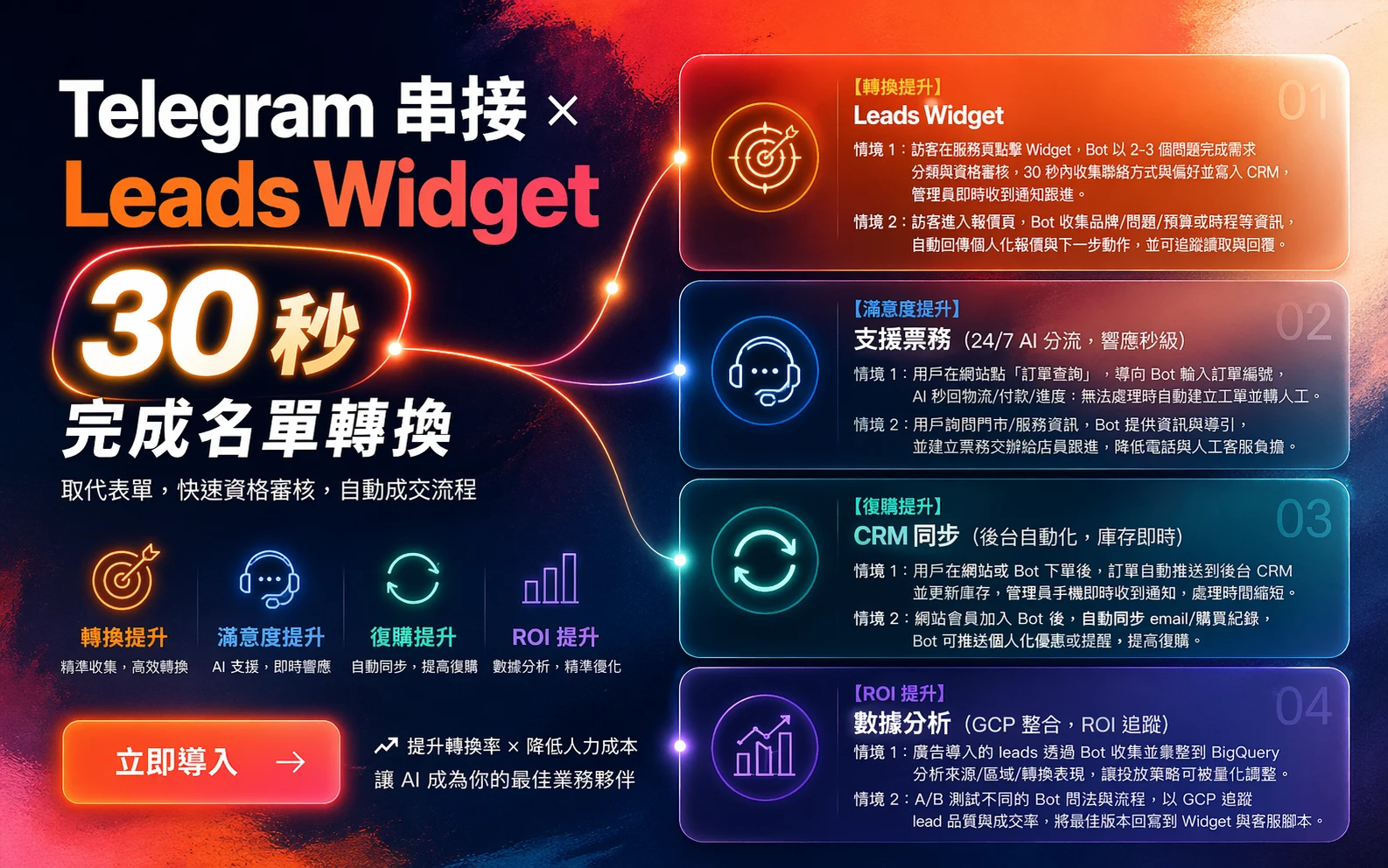
Leads Widget (replace forms, qualify leads fast)
Scenario 1: A visitor clicks the widget on a service page. The bot asks 2-3 questions to classify the request and qualify the lead, collects contact details and preferences within 30 seconds, saves them to the CRM, and alerts an admin to follow up.
Scenario 2: A visitor opens the quote page. The bot collects details such as brand, problem, budget or timeline, sends back a personalized quote and next steps, and tracks reads and replies.
CRM sync (back-office automation, real-time inventory)
Scenario 1: When a customer orders on the website or through the bot, the order goes straight to the back-office CRM and inventory updates. Admins get an instant alert on their phone, so orders are handled faster.
Scenario 2: When site members join the bot, their email and purchase history sync automatically, and the bot can send personalized offers or reminders to drive repeat purchases.
Analytics (GCP integration, ROI tracking)
Scenario 1: Leads from ads are collected by the bot and compiled in BigQuery to analyze source, region and conversion performance, so ad strategy can be adjusted with real numbers.
Scenario 2: A/B test different bot questions and flows, track lead quality and close rates with GCP, and roll the best version into the widget and support scripts.
Metrics summary
| Feature | Use case | Key metric improved |
|---|---|---|
| Leads Widget | Quotes / lead qualification | Higher conversion |
| Support tickets | Order / service inquiries | Higher satisfaction |
| CRM sync | Inventory / member messaging | More repeat purchases |
| Analytics | Ad / test optimization | Higher ROI |